How to Set Up IPTV on MAG Box: Complete Setup Tutorial
Introduction
IPTV (Internet Protocol Television) has become the go-to option for streaming live TV shows, movies, and sports content online. If you’re looking for a reliable and simple way to enjoy IPTV on your TV, setting up IPTV on a MAG Box is one of the most efficient methods. This IPTV setup tutorial will walk you through the process of configuring your MAG Box, ensuring a smooth IPTV experience in no time.
Whether you’re a beginner or have some prior knowledge, this guide will help you get started with IPTV setup on MAG Box for 2025.
What You’ll Need for IPTV Setup
Before you start the setup process, gather the following items:
A MAG Box (MAG 254, MAG 322, MAG 420, etc.)
A stable internet connection
IPTV subscription details from a service provider (this includes the portal URL)
A compatible remote control
A TV with HDMI input
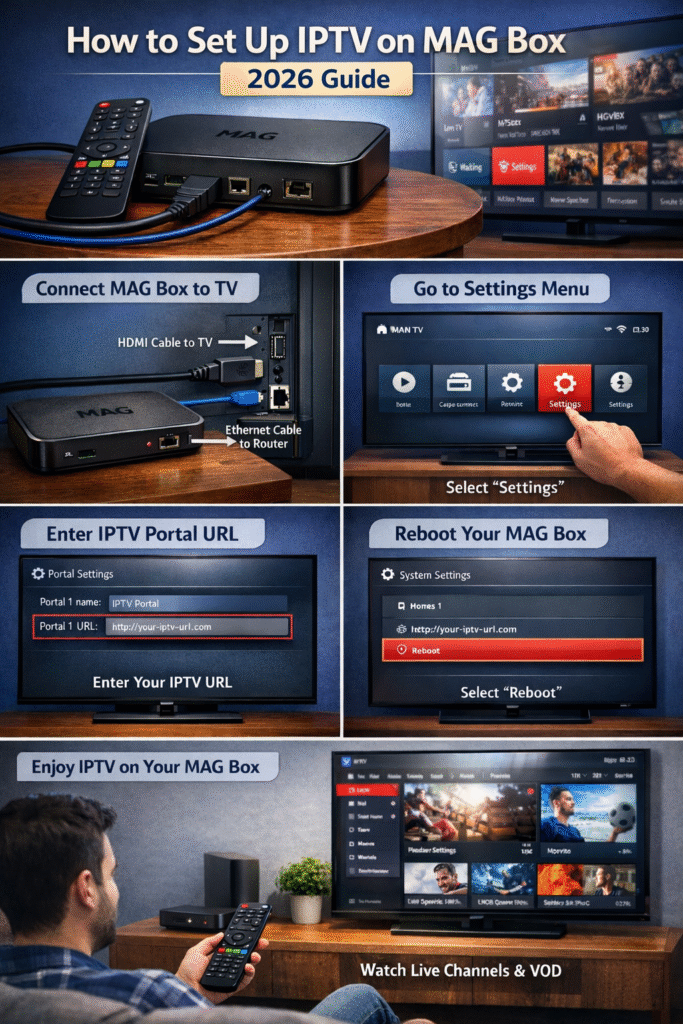
Step 1: Connect Your MAG Box to TV and Router
The first step in your IPTV setup tutorial is connecting your MAG Box to your TV and router:
Plug the MAG Box into your TV using an HDMI cable.
Connect your MAG Box to the internet via Ethernet or Wi-Fi.
Power on the device and wait for it to boot up.
Step 2: Navigate to IPTV Settings
To set up IPTV on your MAG Box, you will need to access the settings menu:
Once the MAG Box is on, use the remote to go to the Settings.
Select System Settings > Network Settings to confirm the internet connection is active.
This step is essential in ensuring that your MAG Box is connected properly to the network for uninterrupted streaming.
Step 3: Enter the IPTV Portal URL
One of the most important steps in setting up IPTV on your MAG Box is entering the portal URL from your IPTV provider:
Go to Portals Settings in the Settings menu.
Enter the IPTV portal URL provided by your service provider.
Confirm the details and click OK.
Once you’ve entered the portal URL, your MAG Box will be ready to access IPTV channels.
Step 4: Reboot Your MAG Box
After entering the portal details, it’s important to restart your device to apply the settings:
In the Settings menu, navigate to Reboot and select it.
Wait for the device to reboot, ensuring the IPTV portal loads correctly.
Step 5: Start Watching IPTV on MAG Box
Once your device reboots, you’ll be able to access live TV channels, Video on Demand (VOD), and other content from your IPTV subscription:
Navigate to the IPTV portal you configured earlier.
Browse through the available channels and content.
Enjoy the smooth streaming experience provided by your MAG Box and IPTV service!
Troubleshooting Common Issues with IPTV Setup on MAG Box
Sometimes, issues may arise during the setup. Here are a few common problems and how to resolve them:
No Signal: Ensure the MAG Box is properly connected to the TV and HDMI input is correct.
Portal Not Loading: Double-check the portal URL for typos or connectivity issues. Make sure your internet connection is stable.
Connection Problems: If using Wi-Fi, try switching to a wired Ethernet connection for better reliability.
How to Get IPTV for Your MAG Box: Selling IPTV Services
If you’re considering selling IPTV services or offering subscriptions to others, there are several steps you need to take to ensure a successful IPTV business:
Find Reliable IPTV Providers: Partner with reputable IPTV providers who offer stable and high-quality streaming services.
Offer Custom IPTV Packages: Tailor IPTV subscriptions for different needs, such as sports, movies, or international channels.
Create a Website for Selling IPTV: A professional website can help you market your IPTV service. Include clear information about pricing, features, and setup instructions for your customers.
Provide Excellent Customer Support: Offer easy-to-follow tutorials, 24/7 customer support, and troubleshooting assistance for customers setting up their IPTV service on devices like MAG Boxes.
By focusing on customer service and offering high-quality IPTV content, you can build a successful IPTV business.
Conclusion
Setting up IPTV on MAG Box is a straightforward process if you follow the right steps. With the IPTV setup tutorial provided, you’ll have your MAG Box running in no time, giving you access to a world of entertainment. Additionally, if you’re interested in selling IPTV, ensure that you provide a seamless experience for your customers and keep them engaged with great content and support.
Choose Your Perfect Plan
Perfect for individual streamers who want to Set Up IPTV On MAG Box or any other device.
| Duration | Price | Features | Get Started |
|---|---|---|---|
| 24H Trial | $2 |
| Start Trial |
| 1 Month | $11 |
| Subscribe Now |
| 3 Months | $19 |
| Get Access |
| 6 Months | $39 |
| Choose Plan |
| 12 Months | $56 |
| Save More |
| 24 Months | $69 |
| Best Value |